
咨询热线:400 118 6878
本文档主要提供给互亿平台的用户对接接口的使用说明,开发者可以利用互亿无线提供的 HTTP 接口,调用互亿无线的实名认证服务。
GET / POST
1、采用HTTPS协议提交请求
2、通过MD5动态签名方式加密
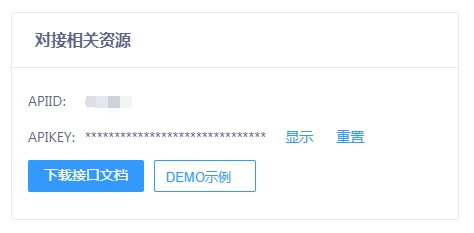
登录用户中心,进入【实名认证】模块,在【产品总览】页面右侧,如下图所示:
通过POST、 GET 方式进行提交,数据编码采用utf-8格式,24小时全天提交。
内容格式为:Content-Type: application/x-www-form-urlencoded
https://api.ihuyi.com/idcard/operatorcon/Submit.json
| 参数名称 | 参数值描述 | 必填 |
| account | APIID(用户中心【实名认证】-【产品总览】查看) | 是 |
| password | 1、APIKEY(用户中心【实名认证】-【产品总览】查看) 2、动态密码(生成动态密码方式请看该文档末尾的说明) |
是 |
| mobile | 手机号 | 是 |
| time | Unix时间戳(10位整型数字,当使用动态密码方式时为必填) | 否 |
用户通过http 或 https提交请求到服务器后,服务器会返回一串json格式的字符串,SubmitResult结构说明如下:
| 参数名称 | 类型 | 描述 |
| code | int | 返回值为2时,表示提交成功 |
| idcardid | string | 当提交成功后,此字段为流水号,否则为0 |
| msg | string | 提交结果描述 |
| result | object | 查询结果 |
| result.status | int | 查询状态(2:成功,1:失败) |
| result.info | object | 其他参数 |
| result.info.operator_real | int | 号码实际所属运营商(1:移动;2:联通;3:电信) |
| result.info.consumption | int | 消费区间(根据运营商匹配) 移动(1:[0,50);2:[50,100);3:[100,150);4:[150,200);5:[200,+∞);单位:元) 联通(0:(-∞,0];1:(0,40];2:(40,80];3:(80,160];4:(160,+∞);单位:元) 电信(1:[0,50);2:[50,100);3:[100,200);4:[200,300);5:[300,400);6:[400, +∞);单位:元) |
| result.info.is_xhzw | int | 携号转网 (1:是,0:否) |
| result.info.operator | int | 号码所属运营商(1:移动;2:联通;3:电信) |
示例(成功)
{"code":2,"msg":"提交成功","idcardid":"16236437872836","result":{"status":2,"info":{"operator_real":2,"time_online":2,"operator":1,"is_xhzw":0}}}
示例(失败)
{"code":405,"msg":"用户名或密码不正确","idcardid":"0"}
| code | msg |
| 0 | 未知错误 |
| 1 | 提交失败 |
| 2 | 提交成功 |
| 400 | 非法ip访问 |
| 401 | 帐号不能为空 |
| 402 | 密码不能为空 |
| 403 | 应用不存在 |
| 407 | 手机号不能为空 |
| 4071 | 手机格式不正确 |
| 408 | 查询无结果 |
| 405 | API ID或API KEY不正确 |
| 4050 | 账号被冻结 |
| 40501 | 动态密码已过期 |
| 40502 | 动态密码校验失败 |
| 40505 | 没有签定合同 |
| 4051 | 剩余条数不足 |
| 4052 | 访问ip与备案ip不符 |
| 4086 | 通道无效 |
| 4010 | 通道错误 |
https://api.ihuyi.com/idcard/operatorcon/Submit.json?account=APIID&password=APIKEY&mobile=手机号
通过接口可以方便的查询你的账户剩余条数。
内容格式为:Content-Type: application/x-www-form-urlencoded
https://api.ihuyi.com/idcard/operatorcon/GetNum.json
| 参数名称 | 参数值描述 | 必填 |
| account | APIID(用户中心【实名认证】-【产品总览】查看) | 是 |
| password | 1、APIKEY(用户中心【实名认证】-【产品总览】查看) 2、动态密码(生成动态密码方式请看该文档末尾的说明) |
是 |
| time | Unix时间戳(10位整型数字,当使用动态密码方式时为必填) | 否 |
用户通过http 或 https提交请求到服务器后,服务器会返回一串json格式的字符串,GetNumResult结构说明如下:
| 参数名称 | 类型 | 描述 |
| code | int | 状态返回值 |
| msg | string | 查询结果描述 |
| num | string | 剩余数量 |
示例(成功)
{"code":2,"msg":"查询成功","num":123}
示例(失败)
{"code":405,"msg":"用户名或密码不正确","num":0}
| code | msg |
| 2 | 查询成功 |
| 400 | 非法ip访问 |
| 401 | 帐号不能为空 |
| 402 | 密码不能为空 |
| 403 | 应用不存在 |
| 405 | API ID或API KEY不正确 |
| 4050 | 账号被冻结 |
| 40501 | 动态密码已过期 |
| 40502 | 动态密码校验失败 |
| 4052 | 访问ip与备案ip不符 |
https://api.ihuyi.com/idcard/operatorcon/GetNum.json?account=APIID&password=APIKEY
以PHP为例,提交认证的生成方式:
$time = time();
$password = md5($account.$apikey.$app.$mobile.$time);
示例:
APIID:test
APIKEY:1q784322b******
app:operatorcon // 固定值
mobile:13600000000
time:1651544941
结果:$password = md5("test1q784322b******operatorcon136000000001651544941");
注意:所以字符编码统一为 UTF-8
查询剩余条数的生成方式:
$time = time();
$password = md5($account.$apikey.$app.$time);
示例:
APIID:test
APIKEY:1q784322ba1******
app:operatorcon // 固定值
time:1651544941
结果:$password = md5("test1q784322ba1******operatorcon1651544941");
Unix时间戳参考地址:http://tool.chinaz.com/Tools/unixtime.aspx
| 语言 | 代码 |
| JAVA | String date = new java.text.SimpleDateFormat("dd/MM/yyyy HH:mm:ss").format(new java.util.Date(Unix timestamp *1000)) |
| Linux | date -d @Unix timestamp |
| C | strptime(datetime, "%Y-%m-%d %H:%M:%S", &tm_time); unixtime = mktime(&tm_time); |
| C++ | std::time_t t = std::time(0); |
| DELPHI | uses DateUtils; DateTimeToUnix(Now) |
| GO | import "time" cur := time.Now() timestamp := cur.UnixNano() / 1000000 |
| Perl | 先 my $time = Unix timestamp 然后 my ($sec, $min, $hour, $day, $month, $year) = (localtime($time))[0,1,2,3,4,5,6] |
| PHP | date("r", Unix timestamp) |
| Node.js | var date = new Date( time * 1000 ); var time = date.getTime()/1000; |
| Python | 先 import time 然后 time.gmtime(Unix timestamp) |
| Ruby | Time.at(Unix timestamp) |
| SHELL | date +%s //UNIX 的时间戳; |
| VBScript / ASP | DateAdd("s", Unix timestamp, "01/01/1970 00:00:00") |
| VB6 | DateDiff("s", "1970-1-1 0:0:0", ToUnixTime) |
| 易语言 | 时间_到时间戳() |

服务热线:
400 118 6878
服务热线(工作时间):
400 118 6878

业务咨询(非工作时间):
售后咨询(非工作时间):